Testing LLM Systems in Production: CI/CD for Prompt Engineering
 By Bishwambhar Sen
Prompt engineering is often treated as an art form—developers tweak adjectives, add exclamation marks, and re-phrase instructions in a trial-and-error loop. However, when LLM systems scale in production, this casual approach becomes a significant engineering risk.
Changing a single word in a system prompt (e.g., changing "Be brief" to "Explain clearly") can silently break downstream JSON parsers, trigger brand-inappropriate tone shifts, or degrade performance on edge-case queries.
To build reliable applications, teams must treat prompts as code. They must version-control prompts, establish automated Continuous Integration and Continuous Deployment (CI/CD) pipelines, and run evaluation datasets against any prompt changes before code is merged. This article outlines the architecture of a prompt CI/CD pipeline.
The Prompt CI/CD Workflow Architecture
A modern prompt development pipeline is built on GitOps principles:
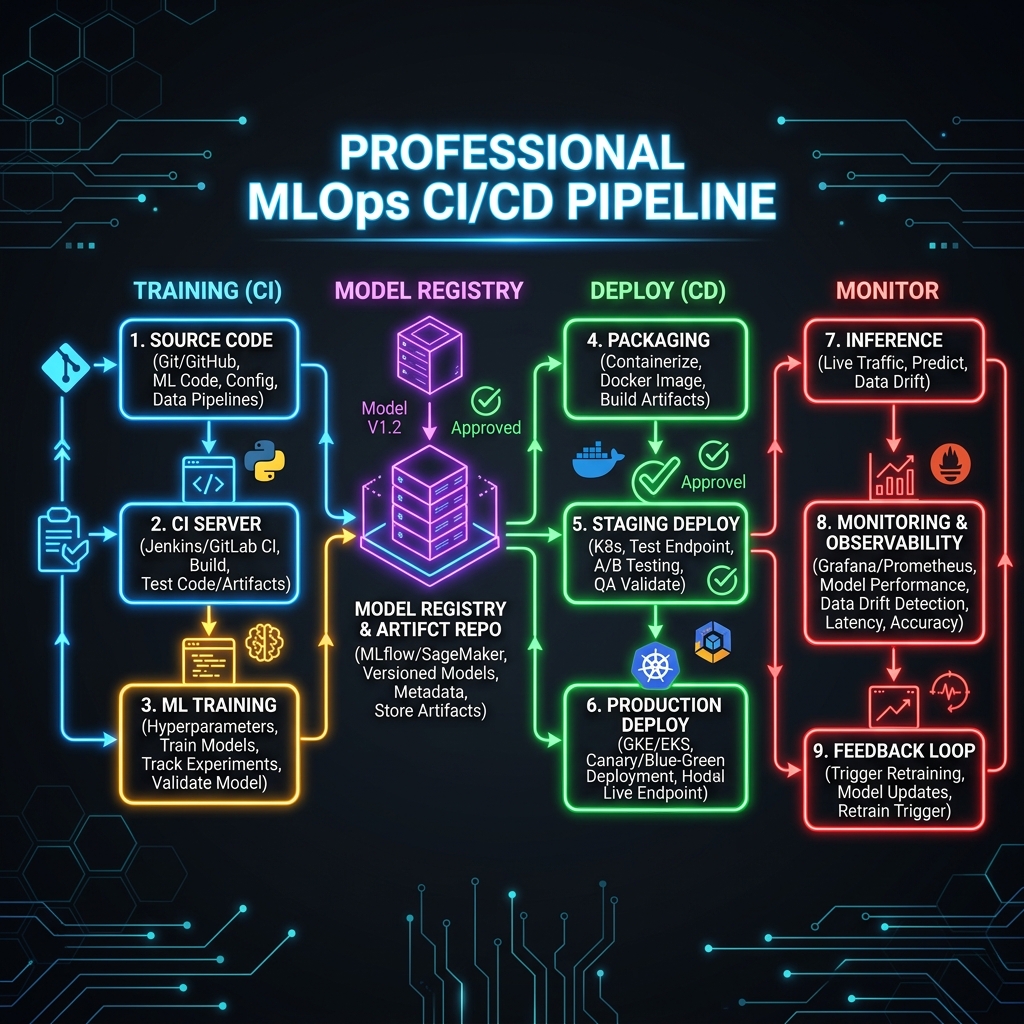 Testing LLM Systems in Production: CI/CD testing pipeline for prompts showing git commits, eval triggers, and prompt deployment
- Prompt Version Control: Prompts are decoupled from application code and stored in structured text or YAML files (e.g.,
prompts/summarizer_prompt.txt). - CI Trigger: A developer creates a Pull Request modifying a prompt.
- Execution Phase: The CI pipeline (e.g., GitHub Actions) loads the modified prompt and runs it against the designated Golden Dataset by querying the LLM provider API.
- Grading & Reporting: An evaluation runner evaluates formatting, schema alignment, and semantic correctness, and outputs a formatted Markdown test report.
- Enforcement: If average similarity scores drop below a threshold, or if formatting checks fail, the build is blocked.
Python CI/CD Evaluation Runner
Below is a complete Python evaluation script designed to run inside a CI pipeline. It reads system prompts, runs test inputs through a mock LLM generator, evaluates output correctness, compiles a Markdown test summary suitable for GitHub PR comments, and raises an exception to fail the build if thresholds are breached.
import sys
import json
from typing import List, Dict, Any

# Mock LLM API generation function
def call_llm_with_prompt(system_prompt: str, user_input: str) -> str:
    """
    Simulates calling the LLM with the active system prompt.
    In a real CI pipeline, this makes an API request to OpenAI, Anthropic, etc.
    """
    # Simulate a regression if the prompt is modified poorly
    if "json only" in system_prompt.lower():
        return '{"response": "Correct processed output."}'
    else:
        # The prompt was edited and omitted the 'json only' rule, returning plain text instead
        return "Processed output: Correct processed output."

# Golden Dataset
eval_dataset: List[Dict[str, Any]] = [
    {
        "id": "PROMPT_TEST_01",
        "input": "Process input data entry ID: 94812",
        "expected_format": "JSON",
        "ground_truth": '{"response": "Correct processed output."}'
    }
]

def run_ci_evaluations(system_prompt_path: str) -> bool:
    print(f"Reading system prompt from: {system_prompt_path}")

    # Read the prompt file from workspace
    # (Using a mock prompt string for representation)
    active_prompt = "Process the incoming text. Return JSON only. Do not add conversational text."

    test_results = []
    failed_tests = 0

    for test in eval_dataset:
        print(f"Running test: {test['id']}...")

        # Execute LLM call using modified prompt
        output = call_llm_with_prompt(active_prompt, test["input"])

        passed = True
        reason = "Passes format check."

        # Perform assertion
        if test["expected_format"] == "JSON":
            try:
                json.loads(output)
            except json.JSONDecodeError:
                passed = False
                reason = "Failed to output valid JSON parsing schema."
                failed_tests += 1

        test_results.append({
            "id": test["id"],
            "input": test["input"],
            "output": output,
            "passed": passed,
            "status": "PASS" if passed else "FAIL",
            "reason": reason
        })

    # Generate Markdown summary report for CI feedback
    markdown_report = [
        "# Prompt CI Evaluation Report",
        f"**Target Prompt File:** `{system_prompt_path}`",
        f"**Overall Results:** {len(eval_dataset) - failed_tests} / {len(eval_dataset)} Passed",
        "\n| Test ID | Input | Status | Details |",
        "| :--- | :--- | :--- | :--- |"
    ]

    for res in test_results:
        status_emoji = "🟢" if res["passed"] else "🔴"
        markdown_report.append(
            f"| {res['id']} | `{res['input']}` | {status_emoji} {res['status']} | {res['reason']} |"
        )

    report_content = "\n".join(markdown_report)
    print("\n--- CI Output Summary ---")
    print(report_content)

    # Save the report artifact to workspace (can be posted back to GitHub PR)
    with open("eval_pr_report.md", "w") as f:
        f.write(report_content)

    # Return true if all tests passed
    return failed_tests == 0

if __name__ == "__main__":
    # Path to edited prompt is typically passed as a script argument
    success = run_ci_evaluations("prompts/system_summarizer.txt")
    if not success:
        print("\n[CI ERROR] Evaluations failed. Blocking build pipeline.")
        sys.exit(1)
    else:
        print("\n[CI SUCCESS] All evaluations passed. Ready to merge.")
        sys.exit(0)
4. Production Observability and Prompt Registries
Once a prompt passes CI/CD, it is merged and deployed.
To manage this lifecycle seamlessly:
- Prompt Registries: Avoid hardcoding prompts in code. Deploy a specialized service (like Langfuse, Pezzo, or AWS AppConfig) that dynamically serves prompt versions to application servers. This allows you to roll back prompt regressions instantly without rebuilding code containers.
- Production Analytics: Continuous evaluation does not stop in CI. Set up production logging to capture:
- Latency: Prompt structural complexity can increase time-to-first-token.
- Negative Feedback Loops: Track occurrences where users request rewrites or downvote answers, helping you identify new edge cases to add to your Golden Dataset.
- Guardrails: Add live evaluation filters (e.g., Llama Guard, NeMo Guardrails) in front of model APIs to catch toxic inputs or flag hallucinated responses in real-time, completing the feedback loop between staging tests and production resilience.
Go deeper in the course
- LLM Evaluation & TestingLesson 5: Prompt Regression TestingSnapshot-test your prompts so refactoring never silently breaks behavior. Design a golden dataset, store expected outputs, and diff new outputs against baselines.
- LLM Evaluation & TestingLesson 4: Unit Testing LLM ApplicationsWrite pytest-based tests for LLM functions using deterministic assertions, regex checks, and LLM-graded assertions. Build a test suite that runs in CI without burning tokens.
- LLM Evaluation & TestingLesson 7: Running Evals in ProductionSample live traffic, log inputs and outputs, run async evals, and set up alerts when quality degrades. Understand the online eval loop that keeps production AI systems healthy.