Secure Code Execution: Sandboxing Arbitrary Code Run by LLM Agents
 By Bishwambhar Sen
Advanced LLM agents are often given code execution capabilities (like writing and running Python code) to solve complex math, analyze datasets, or perform system operations.
However, executing LLM-generated code is a major security risk. If a model generates malicious code—either due to user manipulation or an error—it could access the host file system, install malware, or compromise internal networks.
To minimize this risk, developers must run agent-generated code inside secure, isolated sandboxes.
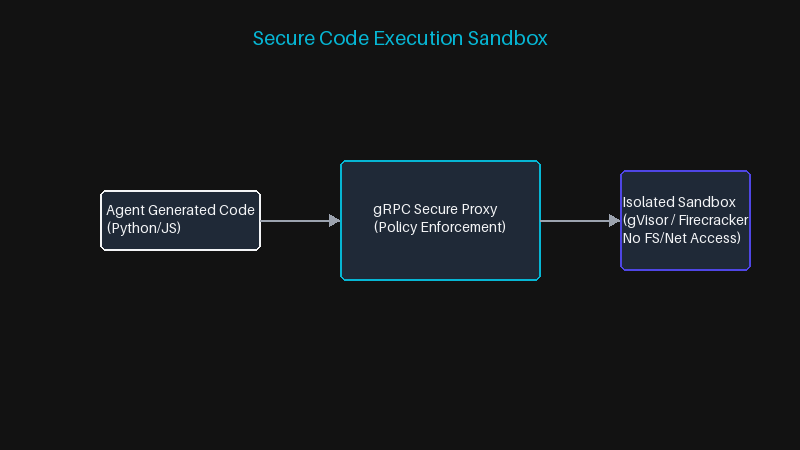 Secure Code Execution Sandbox
Sandbox Security Architectures
To secure code execution, isolation is key:
- System Call Isolation (gVisor): Standard Docker containers share the host Linux kernel. gVisor runs a user-space kernel that intercepts and filters host system calls, significantly reducing kernel exploit risks.
- MicroVMs (Firecracker / Fly.io): Run isolated micro-virtual machines that boot in milliseconds and have dedicated kernels, memory, and network limits.
- WebAssembly (WASM): Compiles and runs code in a lightweight, browser-style virtual machine sandbox with strict access controls.
Sandbox Design Principles
A secure execution sandbox should enforce four main boundaries:
- No Network Access: The sandbox should be offline to prevent data exfiltration.
- Read-Only File System: Restrict writing to a temporary
/tmpdirectory. - Resource Limits: Limit CPU and memory usage to prevent Denial-of-Service (DoS) attacks.
- Execution Timeouts: Automatically terminate loops and long-running scripts.
\text{Timeout Limit } T \leq 10 \text{ seconds}
Python Code: Interfacing with a Container Sandbox
Here is a Python class showing how to run agent-generated code inside a restricted Docker container with timeout limits:
import docker
from docker.errors import ContainerError, ImageNotFound, APIError

class SecurePythonRunner:
    def __init__(self, image: str = "python:3.10-slim"):
        self.client = docker.from_env()
        self.image = image

    def run_code(self, code_str: str, timeout_sec: int = 5) -> str:
        """Run untrusted code in a locked-down container and return its stdout."""
        container = None
        try:
            # Pass the source on stdin-free argv so quoting in code_str cannot
            # break out of the shell command we construct.
            container = self.client.containers.run(
                image=self.image,
                command=["python", "-c", code_str],
                network_disabled=True,      # no egress: blocks data exfiltration
                mem_limit="100m",           # cap RSS to prevent memory-bomb DoS
                pids_limit=64,              # cap processes to prevent fork bombs
                cpu_quota=50000,            # 0.5 CPU of a 100ms period
                read_only=True,             # immutable root filesystem
                tmpfs={"/tmp": "size=16m"}, # single writable scratch directory
                user="nobody",              # drop root inside the container
                cap_drop=["ALL"],           # remove all Linux capabilities
                security_opt=["no-new-privileges"],
                detach=True,
            )

            result = container.wait(timeout=timeout_sec)
            output = container.logs(stdout=True, stderr=True).decode("utf-8", "replace")

            if result.get("StatusCode", 1) != 0:
                return f"Execution failed (exit {result['StatusCode']}):\n{output}"
            return output

        except (ContainerError, ImageNotFound, APIError) as e:
            return f"Execution Error: {e}"
        except Exception as e:
            # container.wait() raises on timeout; kill the runaway process
            return f"Execution timed out after {timeout_sec}s: {e}"
        finally:
            if container is not None:
                container.remove(force=True)


if __name__ == "__main__":
    runner = SecurePythonRunner()

    print(runner.run_code("print(sum(i * i for i in range(10)))"))
    # -> 285

    # Network access is blocked, so this raises inside the sandbox
    print(runner.run_code(
        "import urllib.request; print(urllib.request.urlopen('http://example.com').status)"
    ))
What a Container Actually Buys You
It's worth being precise about the guarantee the code above provides, because it is weaker than it looks. A stock Docker container shares the host kernel. Every one of those flags — dropped capabilities, read-only rootfs, non-root user — narrows the attack surface, but a kernel privilege-escalation bug still gets an attacker onto the host, and such bugs are found regularly. If you are running code written by an adversarial third party rather than by your own model, plain Docker is not the right isolation boundary. That is the specific job gVisor and Firecracker exist to do, and the cost of adopting them (tens of milliseconds of extra boot time, some syscall incompatibility with native extensions under gVisor) is small next to what a container escape costs you.
The mistake I see most often has nothing to do with kernels, though. Teams isolate the sandbox beautifully and then mount a credentials file into it, or run it on a node whose IAM role can read production S3, or leave the cloud metadata endpoint at 169.254.169.254 reachable. network_disabled=True closes that last one; nothing closes the first two except not putting the secrets there. Assume any secret reachable from inside the sandbox is already leaked, and give the container nothing it does not need for the specific computation.
Two more things that only show up under load. Container startup is 200-500ms, which is fine for a code-interpreter tool and unacceptable inside a tight agent loop — pool warm containers or accept the latency, but decide deliberately. And nothing in this design bounds disk growth across runs: remove(force=True) in the finally block matters more than it appears, because an agent that runs a few thousand snippets a day will otherwise fill a host with dead containers long before anyone tries to attack it. The failure that takes your sandbox down is almost always resource exhaustion, not a clever exploit.
Go deeper in the course
- LLM Security & Production HardeningLesson 1: AI Threat ModelingApply the STRIDE threat model to AI systems. Enumerate the unique attack surface of LLM-powered applications: the model, the prompt, the tools, the data pipeline, and the users.
- LLM Security & Production HardeningLesson 2: Prompt Injection — Defense in DepthUnderstand direct and indirect prompt injection attack patterns. Build a multi-layer defense: input sanitization, output validation, privilege separation, and automated attack testing.