Understanding ReAct Agent Loops: How AI Reason and Use Tools
 By Bishwambhar Sen
Large Language Models possess massive internal knowledge bases, but they are frozen in time at their training cutoff date. They also struggle with simple arithmetic and cannot interact with the real world.
To overcome these limitations, we use the ReAct (Reason + Act) framework (Yao et al., 2022). ReAct allows an LLM to solve problems by alternating between reasoning thoughts and execution actions—such as running a search query, querying a database, or invoking a calculator API.
The ReAct Paradigm
Before ReAct, models were either prompt-based reasoning systems (like Chain-of-Thought) or purely action-oriented systems (like WebGPT). ReAct combines these two paradigms:
- Reasoning (Thought): The model analyzes the current situation, identifies what information is missing, and plans the next step.
- Acting (Action): The model interacts with its environment by invoking external tools with specific parameters.
- Observing (Observation): The environment returns the tool's output to the model, which it uses to plan its next move.
This loop repeats until the model has enough information to formulate a final answer:
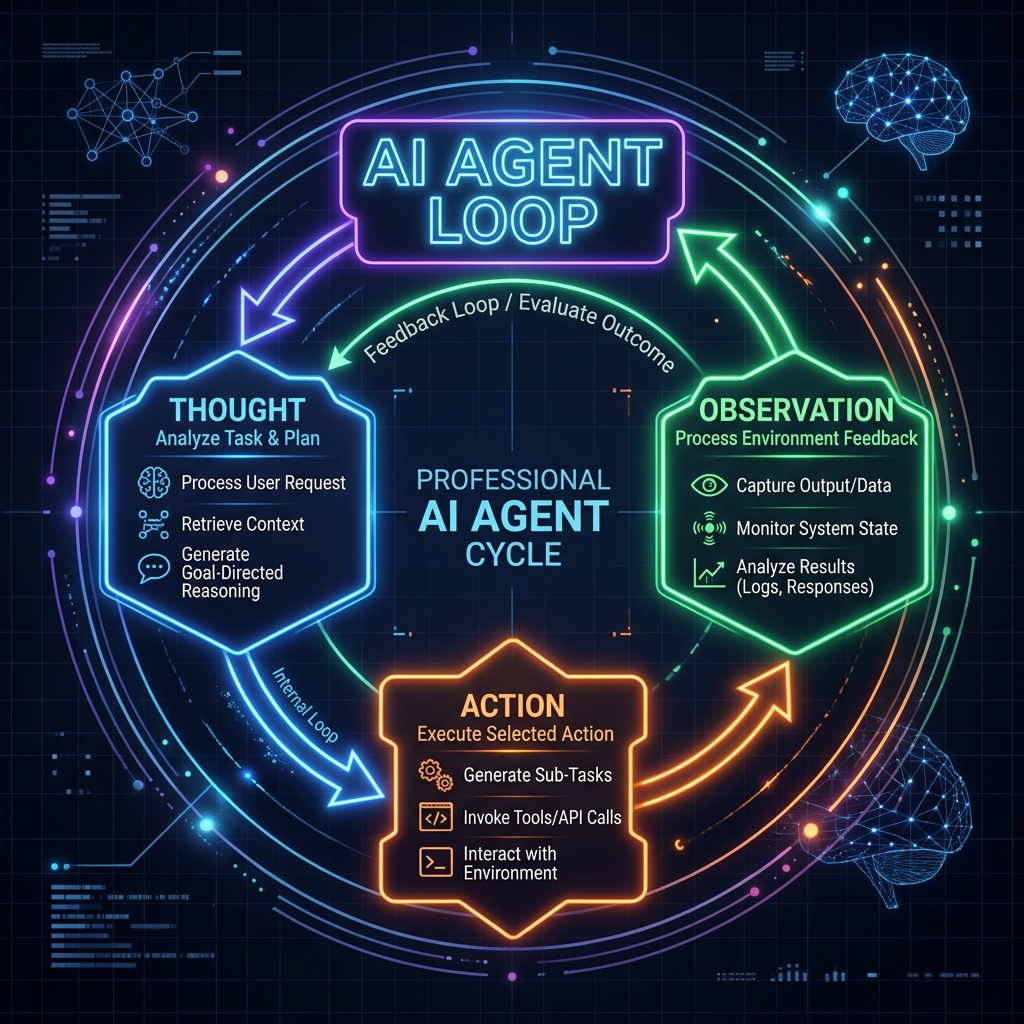 ReAct Agent Loop: Sleek modern flowchart showing Thought, Action, and Observation cycles
Structure of a ReAct Prompt
To implement a ReAct agent, we construct a system prompt that enforces a strict output format. The model must structure its output into four distinct parts:
- Thought: The model's internal reasoning.
- Action: The tool to invoke (e.g.,
wikipedia_searchorcalculator). - Action Input: The input parameter for that tool.
- Observation: The output returned by the execution environment (which the system appends to the prompt).
Here is a sample prompt template:
You are a helpful assistant with access to the following tools:
- web_search: Searches the web for current events.
- calculator: Performs basic mathematical computations.

Format your output exactly as follows:
Thought: Describe your reasoning process.
Action: [tool_name]
Action Input: [input_value]

The system will execute the tool and provide:
Observation: [tool_result]

When you have the final answer, format it as:
Thought: I have the final answer.
Final Answer: [your_response]
Implementing a ReAct Loop in Python
Let's build a fully functioning Python simulator of a ReAct loop. We will define mock tools, parse the LLM's text output, and feed observations back into the agent until it completes its task.
import re

# 1. Define Tools
def calculator(expression):
    """Safely evaluates a basic math expression."""
    try:
        # Note: In production, use a safe parsing library instead of eval
        return str(eval(expression))
    except Exception as e:
        return f"Error: {str(e)}"

def web_search(query):
    """Mock web search database."""
    db = {
        "jupiter moons count 2026": "As of 2026, astronomers have confirmed 95 moons orbiting Jupiter.",
        "distance to mars": "The average distance to Mars is about 225 million kilometers."
    }
    return db.get(query.lower(), "No results found.")

tools = {
    "calculator": calculator,
    "web_search": web_search
}

# 2. Mock the LLM's responses across the turns
mock_llm_turns = [
    # Turn 1
    ("Thought: I need to find the number of moons Jupiter has and double that number. First, I'll search for the number of moons.\n"
     "Action: web_search\n"
     "Action Input: jupiter moons count 2026"),

    # Turn 2
    ("Thought: The search observation states that Jupiter has 95 moons. Now I need to double that number (95 * 2).\n"
     "Action: calculator\n"
     "Action Input: 95 * 2"),

    # Turn 3
    ("Thought: I have calculated the doubled value. 95 * 2 is 190. I can now provide the final answer.\n"
     "Final Answer: Jupiter has 95 moons, and double that amount is 190.")
]

# 3. The Execution Loop
def run_react_agent(question):
    print(f"Question: {question}\n" + "="*40)

    agent_history = f"Question: {question}\n"
    turn_index = 0

    while turn_index < len(mock_llm_turns):
        # In a real app, you would call the LLM API: llm.generate(agent_history)
        llm_response = mock_llm_turns[turn_index]
        print(llm_response)
        agent_history += llm_response + "\n"

        # Check if the agent is ready with the final answer
        if "Final Answer:" in llm_response:
            break

        # Parse Action and Action Input
        action_match = re.search(r"Action:\s*(\w+)", llm_response)
        action_input_match = re.search(r"Action Input:\s*(.+)", llm_response)

        if action_match and action_input_match:
            tool_name = action_match.group(1).strip()
            tool_input = action_input_match.group(1).strip()

            if tool_name in tools:
                print(f"\n--- System executing tool '{tool_name}' with input '{tool_input}' ---")
                observation = tools[tool_name](tool_input)
                print(f"Observation: {observation}\n" + "-"*40)
                agent_history += f"Observation: {observation}\n"
            else:
                print(f"\nError: Tool '{tool_name}' not found.")
                break
        else:
            print("\nError: Failed to parse action.")
            break

        turn_index += 1

# Execute the mock agent
run_react_agent("How many moons does Jupiter have, and what is that number doubled?")
Benefits of the ReAct Framework
ReAct agents offer several key advantages over static LLM pipelines:
- Factuality: By searching external sources (Google, Wikipedia, databases), agents reduce hallucinations.
- Traceability: Users can inspect the agent's reasoning step-by-step to understand how it reached its conclusion.
- Flexibility: The same LLM core can adapt to different environments simply by changing the set of tools it has access to.
The Part the Demos Skip
Every ReAct tutorial, this one included, uses a mocked loop that terminates in three turns. Real loops do not terminate politely. The dominant production failure is the agent that gets an unhelpful observation — No results found. — and responds by reissuing a near-identical search, then another, until it burns through its context window or your budget. Cap iterations hard (five to eight is usually right), and treat hitting the cap as a failure to surface, not a silent fallback to whatever the model says next.
Two other things bite. First, parsing: the loop above depends on the model emitting Action: and Action Input: exactly, and it will eventually emit Action: web_search("jupiter moons") or wrap the whole thing in a code fence. If your provider supports native structured tool-calling, use it and delete the regex — text-format ReAct is worth implementing to understand the pattern, but it is not what you want on the critical path. Second, cost: each turn resends the entire accumulated history, so a six-step task is roughly quadratic in tokens, not linear. That's the real reason a ReAct agent answering a question a single retrieval call could have answered feels so expensive.
Which points at the honest limitation. ReAct earns its overhead when the next step genuinely depends on what the previous step returned. When the sequence of tools is knowable in advance — fetch the user's record, then look up their plan, then format a reply — a hardcoded chain is faster, cheaper, and debuggable with a stack trace. Reach for the agent loop when you can't write the flowchart, not because the flowchart would be tedious to write.