LangChain vs. LangGraph: From Simple Chains to Cyclical Agent State Machines
 By Bishwambhar Sen
When building applications with Large Language Models (LLMs), the architecture typically evolves through three phases: simple prompt wrappers, linear chains, and autonomous agents.
As developers hit the limits of basic prompting, orchestration frameworks become necessary. While LangChain popularized the concept of chaining LLM calls in a linear fashion, LangGraph was developed to support stateful, cyclical multi-agent workflows. This article contrasts these two frameworks, examining when to use each and how their architectures differ.
LangChain: Linear Directed Acyclic Graphs (DAGs)
LangChain was built to assemble sequences of operations—known as chains—to process natural language. At its core, LangChain models the interaction as a Directed Acyclic Graph (DAG), where data flows in one direction from input to output.
LangChain Expression Language (LCEL)
To streamline this process, LangChain introduced the LangChain Expression Language (LCEL), which uses the pipe operator (|) to bind prompt templates, models, and output parsers together:
Input --> PromptTemplate --> LLM --> OutputParser --> Output
This model is powerful for straightforward, predictable tasks such as:
- Document summarizing.
- Structured data extraction.
- Basic Retrieval-Augmented Generation (RAG) where the document is retrieved once and passed to the LLM.
The Limitation: No Loops
Real-world problem-solving is rarely linear. Consider a code-generation agent that writes code, runs a unit test, captures the error output, and passes the error back to the LLM to write a corrected version. This requires a loop (a cycle).
In standard LangChain, building cycles is difficult. While you can construct loops via recursive Python code, the framework itself has no native mechanism to track state across cyclical execution blocks, perform branching decisions easily, or support human-in-the-loop approvals.
LangGraph: Stateful, Cyclical Graph Framework
LangGraph, built by the same creators of LangChain, is a separate library designed to address these limitations. It models agent architectures as state machines represented by graphs.
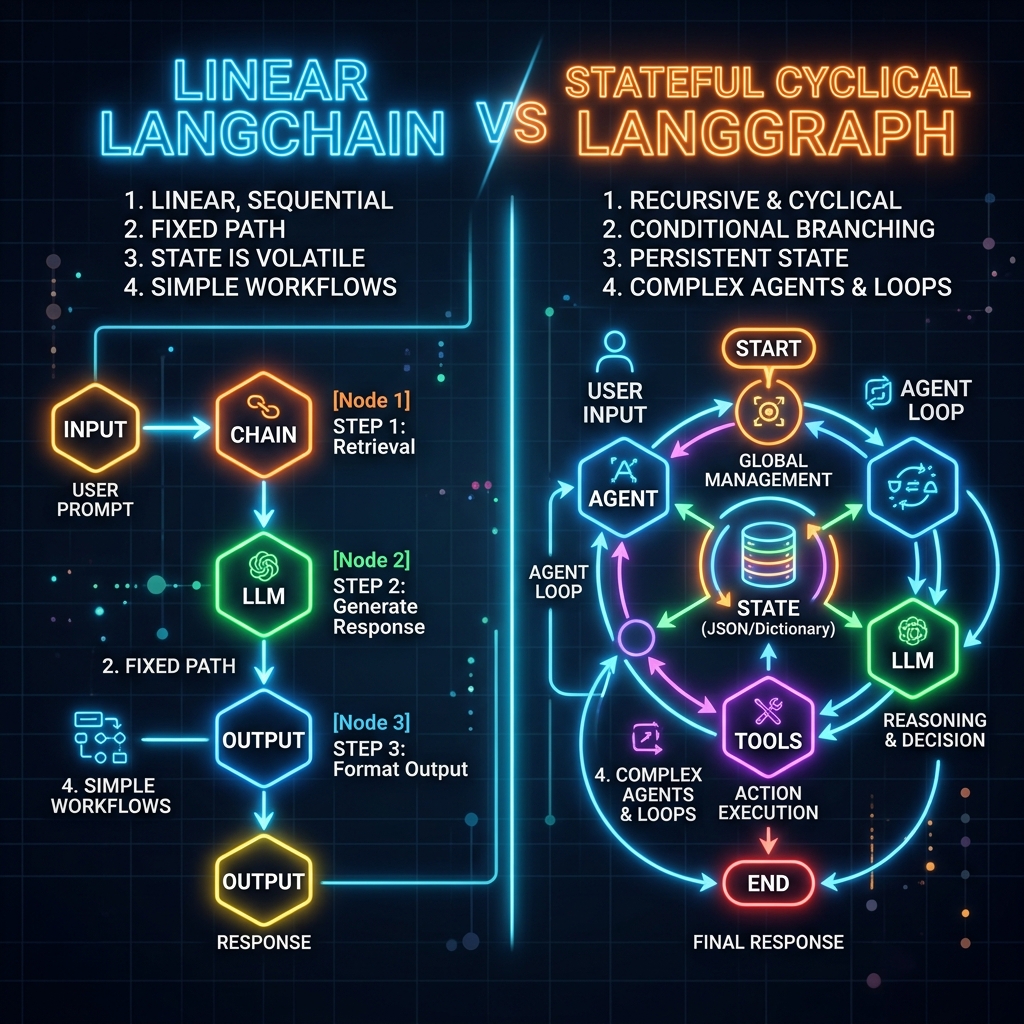 LangChain vs. LangGraph: Comparison diagram showing linear LangChain chains vs stateful cyclical LangGraph state machines
The Three Core Concepts of LangGraph
- State: A shared, global data structure (typically a Python dictionary or a Pydantic object) that represents the current state of the application. Each node in the graph can read from and write to this state.
- Nodes: Private functions or runnable steps that accept the current state as input, perform a task (like calling an LLM or running a script), and return updates to write back to the state.
- Edges: Connective pathways that determine the execution order.
- Normal Edges: Route execution from one node to the next.
- Conditional Edges: Dynamically route the workflow based on the values in the current State.
Side-by-Side Code Comparison
1. LangChain: Linear LCEL Chain
Below is a standard LangChain implementation that structures a linear translation-and-formatting pipeline.
from langchain_core.prompts import ChatPromptTemplate
from langchain_core.output_parsers import StrOutputParser
from langchain_openai import ChatOpenAI

# Initialize Model
model = ChatOpenAI(model="gpt-4o-mini", temperature=0)

# Build Prompt and Output Pipeline
prompt = ChatPromptTemplate.from_template(
    "Translate the following English text to French: {text}"
)
output_parser = StrOutputParser()

# Linear Chain Execution using LCEL
translation_chain = prompt | model | output_parser

result = translation_chain.invoke({"text": "Hello, how are you today?"})
print(result)
# Output: "Bonjour, comment allez-vous aujourd'hui ?"
2. LangGraph: Stateful Cyclical Agent
Below is a complete LangGraph script that defines a simple agent capable of looping back to query a tool if it determines that it needs more information to answer the user's question.
from typing import Annotated, TypedDict
from typing_extensions import Literal
from langgraph.graph import StateGraph, START, END
from langchain_core.messages import BaseMessage, HumanMessage, AIMessage
from langchain_openai import ChatOpenAI

# 1. Define State
# The State object maintains the history of messages between loops.
class AgentState(TypedDict):
    messages: list[BaseMessage]

# Initialize Model and Tool Definition
model = ChatOpenAI(model="gpt-4o-mini", temperature=0)

# 2. Define Nodes
def call_agent(state: AgentState):
    """Invokes the LLM based on the current message list state."""
    messages = state["messages"]
    response = model.invoke(messages)
    # Return a dict containing the updates to the message key
    return {"messages": [response]}

def call_tool(state: AgentState):
    """Mock node simulating a database query tool."""
    # We append a mock system message representing our database output
    tool_output = AIMessage(content="[Tool Output: Server CPU load is 42%]")
    return {"messages": [tool_output]}

# 3. Define Conditional Edge Router
def should_continue(state: AgentState) -> Literal["continue", "end"]:
    """Inspects the last message to decide if we need the tool node."""
    last_message = state["messages"][-1]
    # In a real agent, this would check for LLM tool_calls.
    # For this mock, we search for the keyword 'status' in the prompt.
    if "status" in last_message.content.lower() and len(state["messages"]) < 3:
        return "continue"
    return "end"

# 4. Construct Graph
workflow = StateGraph(AgentState)

# Add Nodes
workflow.add_node("agent", call_agent)
workflow.add_node("tool", call_tool)

# Set Entrypoint
workflow.add_edge(START, "agent")

# Add Conditional Edges
workflow.add_conditional_edges(
    "agent",
    should_continue,
    {
        "continue": "tool",
        "end": END
    }
)

# Connect tool back to the agent (loop/cycle)
workflow.add_edge("tool", "agent")

# Compile into a runnable application
app = workflow.compile()

# 5. Run Graph
initial_state = {"messages": [HumanMessage(content="Check system status.")]}
final_state = app.invoke(initial_state)

for message in final_state["messages"]:
    print(f"{type(message).__name__}: {message.content}")
Architectural Comparison
| Dimension | LangChain | LangGraph | | :--- | :--- | :--- | | Graph Type | Directed Acyclic Graph (DAG) | Cyclical Directed Graph | | State Management | Ephemeral, passed sequentially | Persistent, shared, and updated via reducers | | Native Loops | No | Yes | | Human-in-the-loop | Difficult (requires hacks) | Built-in via State breakpoints | | Control Flow | Implicit (model orchestration) | Explicit (graph nodes and edges) | | Primary Use Cases| Single-turn tasks, RAG pipelines | Multi-step reasoning, agents, code interpreters |
A word of warning before you reach for LangGraph: the most common failure I see is teams porting a perfectly good linear chain into a graph because graphs feel more "agentic." You end up with four nodes, no cycles, a TypedDict you have to keep in sync with every node signature, and a recursion_limit error the first time a conditional edge misroutes. If your workflow has no loop and no branch that depends on runtime state, a graph is pure overhead — LCEL already does that job in three lines.
The honest tradeoff is debuggability versus ceremony. LangGraph's explicit state makes failures inspectable: you can checkpoint, replay from a node, and see exactly which value caused a route. That is worth a lot once an agent runs for twenty steps and occasionally does something insane. It is worth very little on a summarization endpoint. Also budget for the loop-termination problem — cyclical graphs do not stop on their own, so every conditional edge needs a hard step counter or cost ceiling in the state, not just a semantic "am I done?" check from the model. Models will happily say they need one more tool call forever.
Start linear. Move to a graph the first time you write a while loop around a chain by hand — that is the real signal, not the framework marketing.
Go deeper in the course
- AI Agent FrameworksLesson 1: LangChain — Chains, Runnables & LCELBuild composable LLM pipelines using LangChain Expression Language (LCEL). Chain prompt templates, LLMs, and output parsers into reusable Runnables with streaming and async support.
- AI Agent FrameworksLesson 2: Stateful Agents with LangGraphModel agent behavior as a state graph: define nodes, edges, and conditional routing. Build a ReAct agent that loops until done — with full control over state at each step.